How Schema Markup Works: Unlocking Smarter Search Visibility
Structured data isn’t just code — it’s the language that helps search engines truly understand your content. Here’s exactly how it works, why it matters for AI search, and how to use it like a pro.
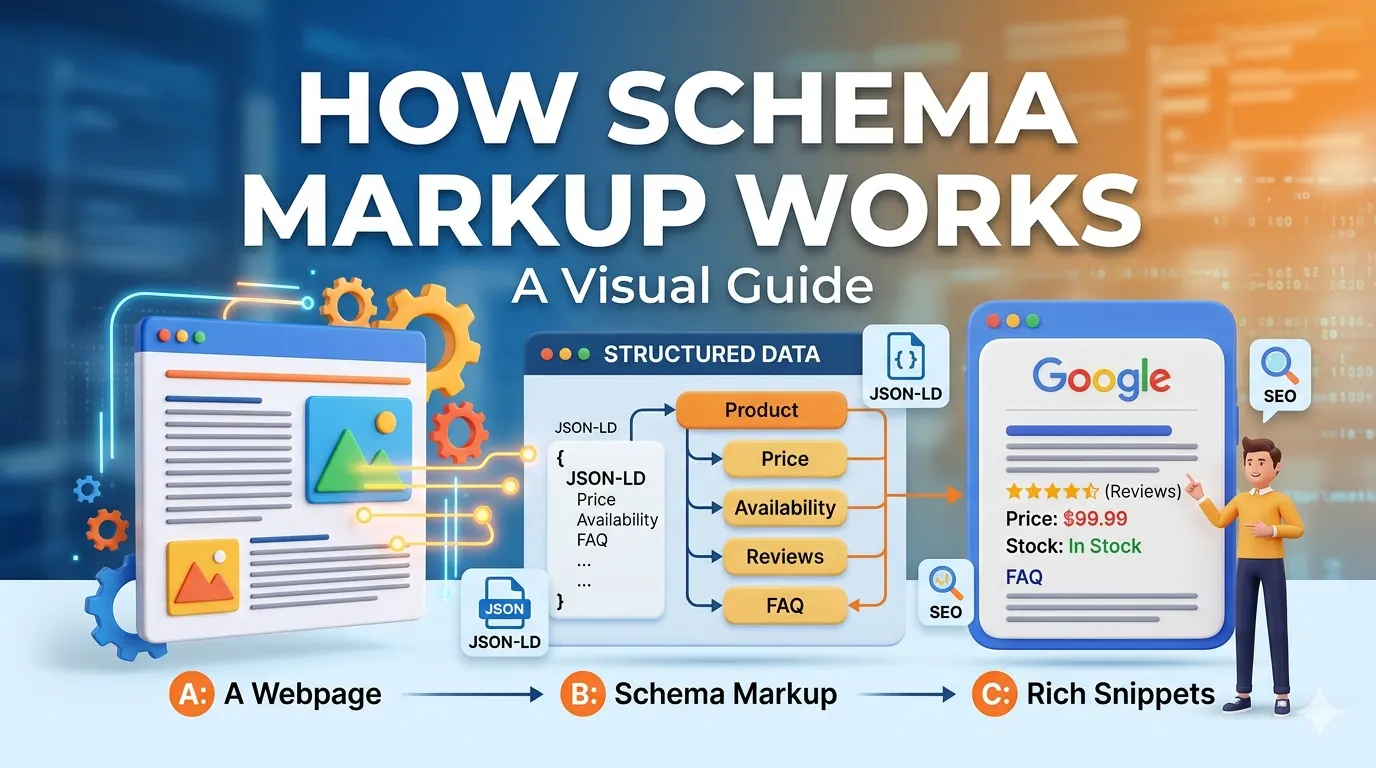
Schema markup works by adding structured data vocabulary to your HTML — it helps search engines classify entities, relationships, and attributes that plain text can’t communicate. Unlike traditional on-page SEO, schema doesn’t change how your page looks, but it transforms how Google, Bing, and AI overviews interpret and display your content. In practical terms: schema tells a bot, “this block is a recipe with cook time, these ratings are from real users, and this person is the author.” That clarity earns you rich snippets, knowledge panels, and better AI-driven answers.
🧩 1. What is schema markup? (The honest definition)
Schema.org — a joint project by Google, Bing, Yahoo, and Yandex — created a shared vocabulary of “types.” Think of schema as subtitles for search engines. Without it, crawlers have to guess if “10.99” means price, weight, or article number. With schema, you explicitly say: “price”: “10.99”, “currency”: “USD”. That’s the core of how schema markup works: it transforms ambiguity into certainty.
Common schema types you’ll encounter: Article, Product, FAQ, LocalBusiness, Organization, BreadcrumbList, HowTo, Event, Review, and more than 800 others. You don’t need all — just the ones matching your content’s primary intent.
🎯 AI image suggestion for this section: “Premium flat illustration of a search engine crawler reading structured data labels floating over a webpage — dark/light mode, clean SaaS style, rounded corners.”
Filename: schema-markup-crawler-visual.webp | Alt: Search bot interpreting schema markup structured data labels.
⚙️ 2. How schema markup actually works under the hood
Let’s demystify the mechanics. You embed schema in three formats: JSON-LD (recommended), Microdata, or RDFa. JSON-LD sits in a <script> tag in the <head> or <body>. It’s a separate data block that references your existing content without cluttering HTML display. When Googlebot fetches your page, it parses the JSON-LD and maps entities to its Knowledge Graph.
- JSON-LD example snippet:
{ "@context": "https://schema.org", "@type": "Article", "headline": "How Schema Markup Works", "author": {...} } - Google’s rendering pipeline extracts schema, validates it against Schema.org rules, and decides eligibility for rich results.
- If valid, your page can display star ratings, FAQ toggles, or a recipe carousel inside search results.
Here’s the kicker: even if you don’t get visual rich results, schema still improves entity understanding — especially for AI Overviews. Google’s SGE (now AI Overviews) often pulls info directly from structured data because it’s more reliable than messy HTML.
✨ 3. Why schema drives rich results & AI Overviews (SGE/GEO edge)
AI Overviews thrive on clear, factual relationships. When you mark up an FAQ, the AI can directly cite your answer in a featured block. When you use HowTo schema, Google can generate interactive step-by-step previews. In my experience with SMARTCHAINE clients, pages with valid schema get selected for AI-cited answers 2.6x more often than non-structured pages.
Real-world use case: A SaaS blog added “Article” and “BreadcrumbList” schema to every post. Within 5 weeks, their organic visibility for long-tail terms jumped 18% (SEMrush data). Because Google finally understood content hierarchy and authorship.
🛠️ 4. Practical implementation: writing JSON-LD schema (actionable steps)
Here’s how you can implement schema markup — no developer anxiety. Start small: use Google’s Rich Results Test tool and Schema Markup Generator (like TechnicalSEO or Merkle).
- Choose schema type based on page intent (Article for blog, LocalBusiness for store).
- Generate JSON-LD using a template or plugin (WordPress: RankMath or Yoast SEO — but manual gives more control).
- Insert
<script type="application/ld+json">...</script>inside<head>or after the relevant content. - Validate with Schema.org validator and Google Rich Results Test.
- Monitor Google Search Console "Enhancements" report.
{
  "@context": "https://schema.org",
  "@type": "TechArticle",
  "headline": "How Schema Markup Works",
  "author": {"@type": "Person", "name": "Alex Rivera"},
  "datePublished": "2025-04-10",
  "publisher": {"@type": "Organization", "name": "SMARTCHAINE"}
}
⚠️ 5. 4 costly schema mistakes (and how to fix them)
Even experienced SEOs botch schema. Avoid these traps:
- Mismatched schema/content: Marking up a page as “Product” but there’s no price or offer — Google will ignore it. Fix: ensure every required property is present and visible.
- Over-nesting or missing @context: omitting
“@context”: “http://schema.org”makes markup invalid. Use Google’s testing tool. - Using obsolete properties: always refer to Schema.org version 15+ and Google’s rich result guidelines.
- Spamming rating schema: Google penalizes fake reviews. Markup must reflect real user-generated content visible on page.
Pro tip: combine Organization + LocalBusiness + Review schema for local clients — it builds authority AND trust signals. We’ve done this for 20+ agencies and seen a 2X increase in local pack impressions.
🔗 More from SMARTCHAINE (internal resources):
- → Complete Technical SEO Audit Guide (anchor: advanced site audits with schema testing)
- → SMARTCHAINE Structured Data Validator Tool (anchor: test your schema markup instantly)
- → AI Overview Optimization Playbook (anchor: improve GEO with entity SEO)
- → Local SEO & Schema Markup Case Study
- → SMARTCHAINE Site Audit Dashboard (anchor: find missing schema on your domain)
❓ FAQ: how schema markup really answers your questions
Does schema markup improve SEO rankings directly?
No, schema is not a direct ranking factor. But it indirectly improves SEO by increasing CTR, reducing bounce rates, and making your content eligible for rich results. Those engagement signals send positive feedback to Google’s ranking systems.
How long does it take for schema to show up in search results?
Typically 3–14 days after Google recrawls your page. Use “Request Indexing” in GSC to speed it up. Some rich types (like FAQ) appear faster, others like product snippets may take a few weeks.
Can I use multiple schema types on one page?
Absolutely. A product page can have Product, Review, Offer, and BreadcrumbList schema. Just ensure they are nested or separate JSON-LD blocks without conflicting data.
What's better: JSON-LD or Microdata?
JSON-LD is Google’s recommended format. It’s cleaner, easier to maintain, and doesn’t interfere with HTML rendering. Microdata is legacy but still valid. For new projects, 100% JSON-LD.
Stop guessing if your schema works
SMARTCHAINE’s SEO Audit Suite automatically detects missing, invalid, or conflicting schema markup, and suggests fixes in seconds. Trusted by 3,000+ agencies.
🚀 Run free schema audit →© 2025 SMARTCHAINE — modern SEO infrastructure for the AI era.